Overmind: Brain-of-brains
Overmind is a test controller/device orchestrator for various overnight and ad-hoc automation tasks.
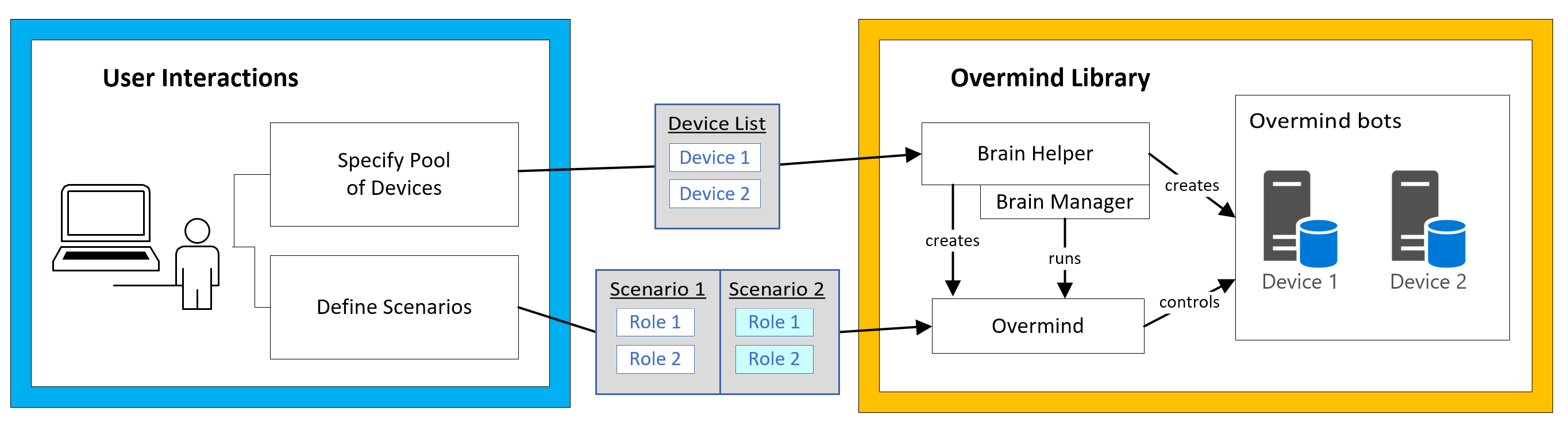
The overmind system provides tools to set up and run automation on a pool of devices, with simple, high-level flexibility to control what the individual bots do. Overmind uses a new concept of "scenarios" to represent an automation run, which may require multiple devices to be completed.
- Overmind: The controller that can communicate with all devices in the pool. Like a normal bot brain, it has a set of urges which it runs across “device bots.”
- Device Bot: The bot associated with a device which runs within the overmind. Its initial state is “free” for any scenario to attempt to use. When taking part in a scenario, each device bot will have a role assigned.
- Scenario: A configured automation run, possibly involving multiple brains or bots. A scenario is simply a collection of roles that run automation on a set of devices until its stop conditions are met.
- Role: Automates a device. Could involve setting up a bot script, bot brain, game state, or another tool.
- Quality Pass: The collection of scenarios organized by a user for a test run.
Overmind uses the bot brain library to coordinate and accomplish the scenarios as efficiently and reliably as possible with the devices available to it. Engineers can use the existing urge and parameter systems to set up this infrastructure, and they can also plug in their own custom UI to support the high-level configuration.
Getting Started
This complete example will demonstrate the capabilities of overmind and help engineers get started on their own implementation. The goals of this demo are to:
- Run a quality pass from C# until all of the scenarios are completed.
- Load the Phoenix module UI and allow users to create quality passes.
- Run a quality pass in the UI and intuitively browse its results in real-time.
Scenarios
The sample code supports multiple different scenario types for the overmind to run with a device pool:
- Simple (single device): launches a game and runs a bot brain for 5 seconds.
- Concurrent (two devices): launches a game on two devices and runs bot brains on both for 5s.
- Sequential (1 or 2 devices): launches a game and runs bot brains for 1 or more actions.
Further, each bot simulates a real game which can randomly crash or fail at a configurable rate. The sample overmind will be responsible for detecting and handling these situations as appropriate.
The overmind loads scenarios through a typical parameter in the brain file like so:
"Parameters": {
  "Scenarios": [
    {
      "Roles": [ { "BasedOn": "AttackRole" } ],
      "StopAfter": [ {"Type": "TotalTimeCondition", "Duration": "00:00:05"} ]
    }]}
Roles
All devices in the sample are assigned the same role type, CrashyRunBrainRole, which has a CrashRate property to simulate in-game actions failing every so often. This is also where the game application to launch is specified, for example:
{
  "Name": "AttackRole",
  "Type": "CrashyRunBrainRole",
  "BrainName": "AttackBrain",
  "Launch": { "ApplicationName": "DummyApp" },
}
Stop Conditions
The sample makes use of these two conditions built-in to the overmind. Title engineers may re-use these as well as create their own custom ones.
ActionFinishedCondition: Measures how many actions have been completed.TotalTimeCondition: Measures how much time has elapsed.
Urges
The title engineer is responsible for configuring the overmind's urges, which work roughly the same as in regular bot brains, except they run on a single context containing all the device bots:
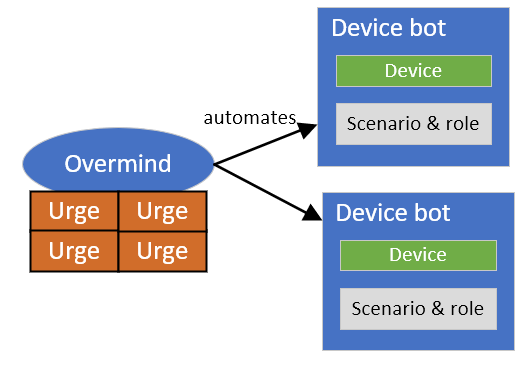
These sample urges serve to give an idea of what interactions may occur to complete a scenario:
AssignRole: Assigns a role to a "free" device bot in the next scenario that has space for it. The role is only assigned if the required number of that role type has not been met. No roles may be assigned if a non-concurrent scenario is running.Launch game: Launches a game on a device once it is assigned a role. The game is launched based on the role's configuration data, and then the device is associated with game state.AssignBrain: Assigns a device bot to a brain, once a game has been launched on that device and a game state can be created.- Crash handling: Gathers logs, diagnostics, etc. if a device fails. After a device fails, it is removed from the scenario and then returned to the device pool to be re-assigned.
"BasedOn" template files
Overmind's resource serialization system allows you to create re-usable template files. In this example scenario, both roles will use the AttackRole.json template from Resources\Overmind\Roles:
"Roles": [
  { "BasedOn": "AttackRole" },
  { "BasedOn": "AttackRole", "Name": "Another attack role" }
],
Examples for automated testing
- How to run your sample overmind with the tools:
- See the
BotBrain.Samples.Toolsproject and tools documentation
- See the
- How to run unit tests and detect when scenarios finished:
- Use the
WaitForAllScenariosFinishedmethod fromOvermindAutomationTests.cs
- Use the
- How to use Device Console for bot automation:
- See how
BotBrain.Samples.Toolsproject's depends on DeviceConsoleFactory forIDeviceProvider
- See how
This page was last modified on April 19 2022, 05:42 PM (UTC).